
Model conditioning prepares a federated 3D model so that every object carries the attributes the project uses to plan, report and package work, with the same property names across every source model. A parser that applies that conditioning as the model loads replaces the manual restructuring that otherwise happens every week before the model is useful to anyone outside engineering.
What Arrives in a Federated Model
The model the project receives is several models in one file. Each authoring tool stores properties under its own names, so a tag is a Tag in one branch, a TagNumber in another and a Name in a third. Some objects carry a CWA attribute and none carry an EWP. Vendor models arrive with no tags at all. Spools and piece marks come from fabricators under their own identifiers, and the selection tree is organized the way the authoring tool stores files, which tells a planner nothing about work areas or packages. Model conditioning is the work of turning that file into something a report or a package can be built on, and it is work that repeats with every model drop.
What a Rule Does
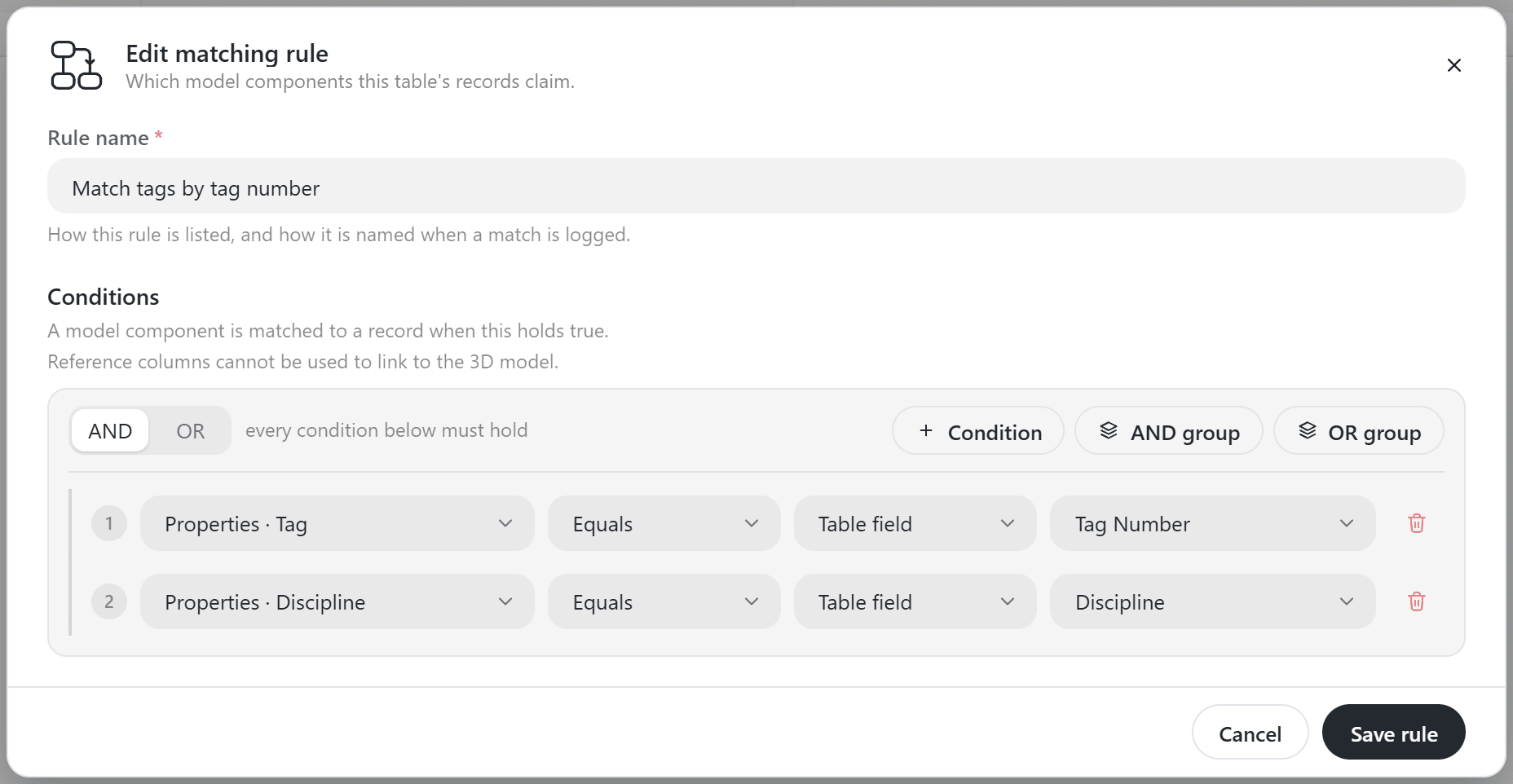
A rule names a model property, an operator and a record field. The model property Tag equals the register field Tag Number. Conditions combine into AND and OR groups, so a rule can read a tag from one property on piping and from another on steel, or match a pipe spool on its spool number when the tag is empty. Rules live on the register whose records own the components, so the Master Tag Register has its own rules and the IWP register has its own. Nobody maps parts by hand. When a vendor model arrives with its tag in the wrong property, the fix is one condition, and the rule runs again on the next load without anyone re-exporting the model.
The Weekly Delivery
With rules in place, the conditioned model goes to the construction contractor on a weekly cadence and loads into the work packaging software with its CWA, CWP and EWP attributes intact. Fabricator models are appended as they are validated, so spools and piece marks join the project model under the project's identifiers. In Navisworks, the Custom Selection Tree from the Navisworks Add-ins rebuilds the tree around the work breakdown, so CWAs and work packages become groups a planner can click, hide and color. In openAWP, a 3D parser cleans the model data as the model loads, with parser rules controlling how each component property is read, and the same conditioned model then drives the 3D model in Power BI with its attributes already in order.
The federation, the rules and the weekly delivery are the BIM services scope on a project. The rules, the conditioned model and the attribute standard are the project's, and they stay with the owner's model when the engagement ends.